Axiom Weather
Axiom Weather is a lightweight atmospheric pipeline built around Unreal Engine's native lighting and atmosphere systems. Rather than replacing your sky or introducing a proprietary lighting controller, it captures snapshots of standard Unreal actors — Directional Light, Volumetric Clouds, Exponential Height Fog, SkyAtmosphere — and stores them as weather states. At runtime, the system performs smooth transitions between those states. The result is fully artist-driven: if you can light a scene in Unreal, you can author a weather state.
Real Time
2025
Real Time VFX
Game Development
TechArt
Axiom Weather
Axiom Weather is a lightweight atmospheric pipeline built around Unreal Engine's native lighting and atmosphere systems. Rather than replacing your sky or introducing a proprietary lighting controller, it captures snapshots of standard Unreal actors — Directional Light, Volumetric Clouds, Exponential Height Fog, SkyAtmosphere — and stores them as weather states. At runtime, the system performs smooth transitions between those states. The result is fully artist-driven: if you can light a scene in Unreal, you can author a weather state.
Real Time
2025
Real Time VFX
Game Development
TechArt
Axiom Weather
Axiom Weather is a lightweight atmospheric pipeline built around Unreal Engine's native lighting and atmosphere systems. Rather than replacing your sky or introducing a proprietary lighting controller, it captures snapshots of standard Unreal actors — Directional Light, Volumetric Clouds, Exponential Height Fog, SkyAtmosphere — and stores them as weather states. At runtime, the system performs smooth transitions between those states. The result is fully artist-driven: if you can light a scene in Unreal, you can author a weather state.
Real Time
2025
Real Time VFX
Game Development
TechArt
Overview
Axiom Weather is built around a simple principle: artists set up lighting and atmosphere exactly as they normally would in Unreal — tweaking the Directional Light, SkyAtmosphere, Volumetric Clouds, Exponential Height Fog, and Post Process Volumes. Once the scene looks right, that setup is captured as a named weather state. Axiom Weather then handles all smooth runtime transitions between those states. It is not a procedural weather simulator. It does not auto-generate weather behavior, time-of-day cycles, or dynamic sky progressions. It is an artist-curated, state-driven transition system — and that is intentional.
Overview
Axiom Weather is built around a simple principle: artists set up lighting and atmosphere exactly as they normally would in Unreal — tweaking the Directional Light, SkyAtmosphere, Volumetric Clouds, Exponential Height Fog, and Post Process Volumes. Once the scene looks right, that setup is captured as a named weather state. Axiom Weather then handles all smooth runtime transitions between those states. It is not a procedural weather simulator. It does not auto-generate weather behavior, time-of-day cycles, or dynamic sky progressions. It is an artist-curated, state-driven transition system — and that is intentional.
Overview
Axiom Weather is built around a simple principle: artists set up lighting and atmosphere exactly as they normally would in Unreal — tweaking the Directional Light, SkyAtmosphere, Volumetric Clouds, Exponential Height Fog, and Post Process Volumes. Once the scene looks right, that setup is captured as a named weather state. Axiom Weather then handles all smooth runtime transitions between those states. It is not a procedural weather simulator. It does not auto-generate weather behavior, time-of-day cycles, or dynamic sky progressions. It is an artist-curated, state-driven transition system — and that is intentional.
Important: Axiom Weather is not a procedural weather generator. Dynamic time-of-day systems, automatic solar/lunar cycles, and procedural scheduling are not included out of the box. See Scope & Extensions for details.
CORE PHILOSOPHY
Most weather solutions for Unreal either require artists to work inside a proprietary editor or replace the native sky and lighting stack entirely. Axiom Weather takes the opposite approach. Artists work in Unreal as they always have. The system captures what they create with standard tools and plays it back smoothly at runtime. No learning curve. No workflow disruption. Everything remains fully compatible with Unreal's standard pipeline from day one.
CORE PHILOSOPHY
Most weather solutions for Unreal either require artists to work inside a proprietary editor or replace the native sky and lighting stack entirely. Axiom Weather takes the opposite approach. Artists work in Unreal as they always have. The system captures what they create with standard tools and plays it back smoothly at runtime. No learning curve. No workflow disruption. Everything remains fully compatible with Unreal's standard pipeline from day one.
CORE PHILOSOPHY
Most weather solutions for Unreal either require artists to work inside a proprietary editor or replace the native sky and lighting stack entirely. Axiom Weather takes the opposite approach. Artists work in Unreal as they always have. The system captures what they create with standard tools and plays it back smoothly at runtime. No learning curve. No workflow disruption. Everything remains fully compatible with Unreal's standard pipeline from day one.
HOW IT WORKS
Axiom Weather operates in two phases. In editor, it captures snapshots of selected actors' settings and stores them as Data Assets — one asset per weather or lighting condition. At runtime, it smoothly interpolates between those Data Assets, applying blended parameter values back onto the referenced native actors. External systems like Niagara particle effects, audio components, and custom gameplay actors participate through a Weather Interface, with no hard dependencies on the core system.
HOW IT WORKS
Axiom Weather operates in two phases. In editor, it captures snapshots of selected actors' settings and stores them as Data Assets — one asset per weather or lighting condition. At runtime, it smoothly interpolates between those Data Assets, applying blended parameter values back onto the referenced native actors. External systems like Niagara particle effects, audio components, and custom gameplay actors participate through a Weather Interface, with no hard dependencies on the core system.
HOW IT WORKS
Axiom Weather operates in two phases. In editor, it captures snapshots of selected actors' settings and stores them as Data Assets — one asset per weather or lighting condition. At runtime, it smoothly interpolates between those Data Assets, applying blended parameter values back onto the referenced native actors. External systems like Niagara particle effects, audio components, and custom gameplay actors participate through a Weather Interface, with no hard dependencies on the core system.
Basic Setup
1. Place your standard Unreal lighting actors in the level — Directional Light, SkyAtmosphere, Volumetric Clouds, Exponential Height Fog, Post Process Volumes.
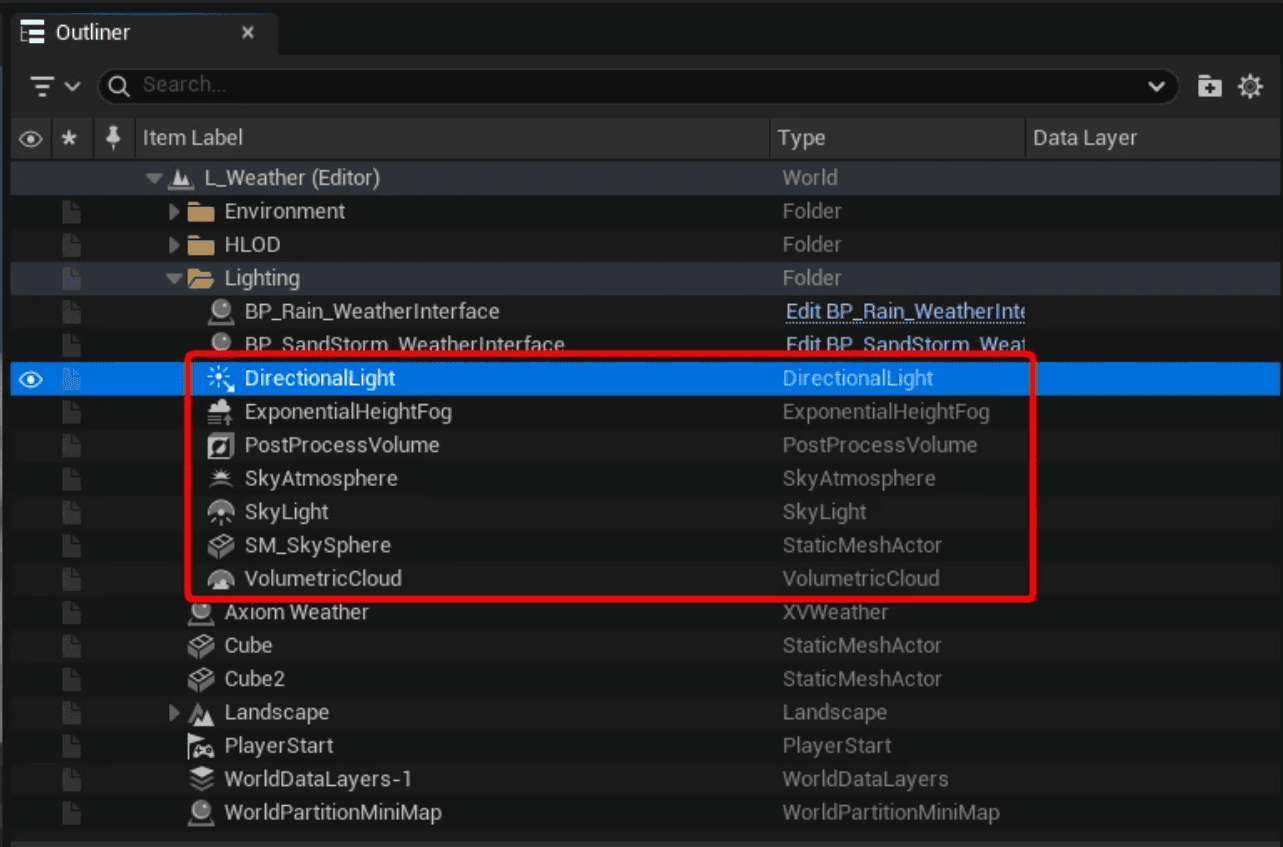
1. Place your standard Unreal lighting actors in the level — Directional Light, SkyAtmosphere, Volumetric Clouds, Exponential Height Fog, Post Process Volumes.
1. Place your standard Unreal lighting actors in the level — Directional Light, SkyAtmosphere, Volumetric Clouds, Exponential Height Fog, Post Process Volumes.
2. Add the Axiom Weather actor to the scene.
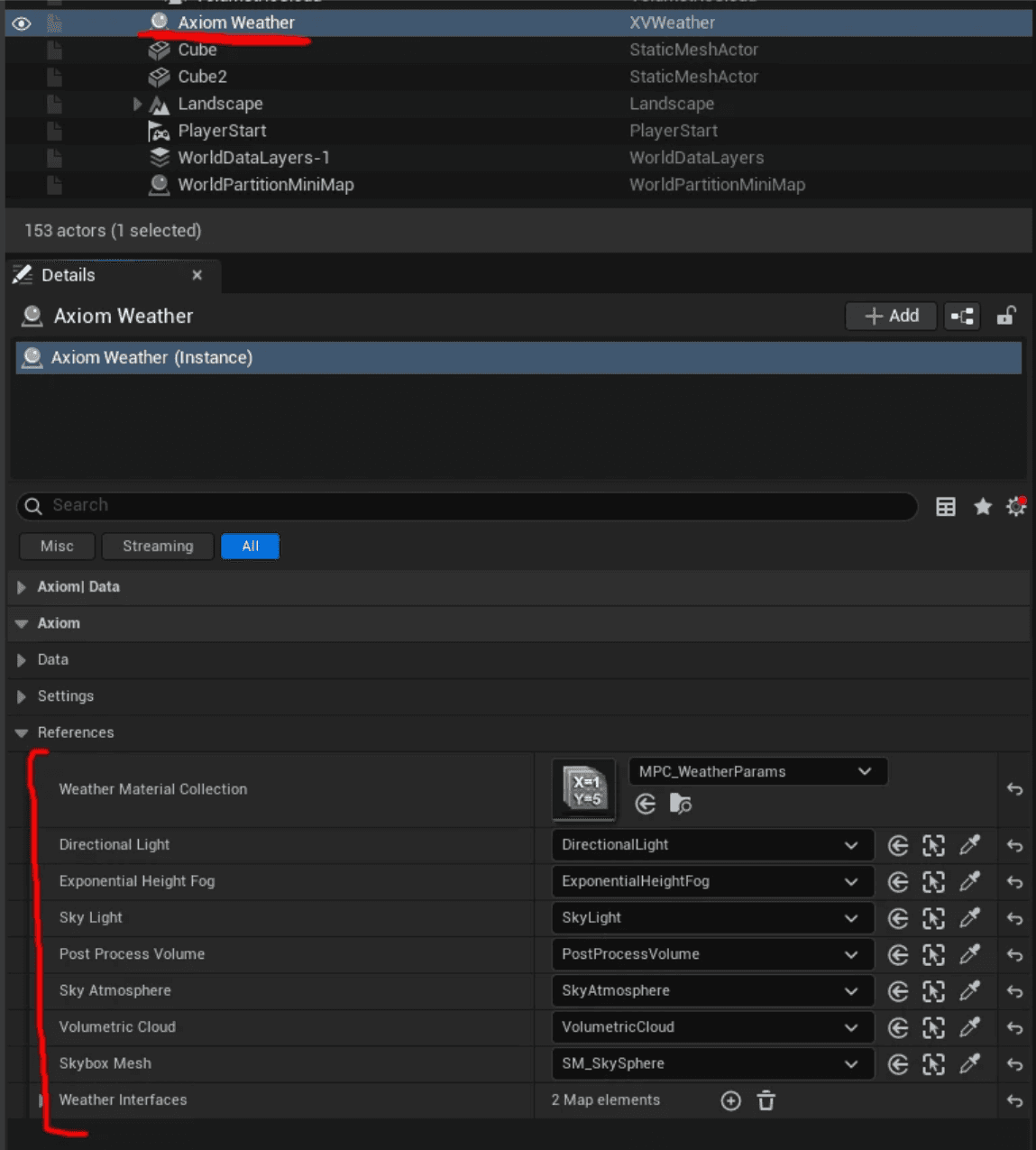
2. Add the Axiom Weather actor to the scene.
2. Add the Axiom Weather actor to the scene.
3. In the Axiom Weather settings, define the Actor Selection — which actors participate in snapshots. Use Search for References to assign them automatically. Optionally register external participants — Niagara systems, audio components, custom Blueprints — via the Weather Interface
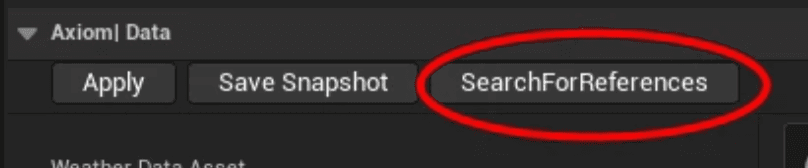
3. In the Axiom Weather settings, define the Actor Selection — which actors participate in snapshots. Use Search for References to assign them automatically. Optionally register external participants — Niagara systems, audio components, custom Blueprints — via the Weather Interface
3. In the Axiom Weather settings, define the Actor Selection — which actors participate in snapshots. Use Search for References to assign them automatically. Optionally register external participants — Niagara systems, audio components, custom Blueprints — via the Weather Interface
Authoring a Weather State
Configure your scene to the desired atmospheric condition using native Unreal controls — adjust the sun angle and intensity, increase fog density, layer darker volumetric clouds, enable a Niagara rain system. When the scene looks right:
Configure your scene to the desired atmospheric condition using native Unreal controls — adjust the sun angle and intensity, increase fog density, layer darker volumetric clouds, enable a Niagara rain system. When the scene looks right:
Configure your scene to the desired atmospheric condition using native Unreal controls — adjust the sun angle and intensity, increase fog density, layer darker volumetric clouds, enable a Niagara rain system. When the scene looks right:
1. Right-click in the Content Browser → Miscellaneous → Data Asset → Axiom Weather Snapshot. Set the new Data Asset in the Weather Data Asset property on the Axiom Weather actor.

1. Right-click in the Content Browser → Miscellaneous → Data Asset → Axiom Weather Snapshot. Set the new Data Asset in the Weather Data Asset property on the Axiom Weather actor.
1. Right-click in the Content Browser → Miscellaneous → Data Asset → Axiom Weather Snapshot. Set the new Data Asset in the Weather Data Asset property on the Axiom Weather actor.
2. Click Save Snapshot — all actor settings are stored in the Data Asset.

2. Click Save Snapshot — all actor settings are stored in the Data Asset.
2. Click Save Snapshot — all actor settings are stored in the Data Asset.
All the settings were saved into this data asset
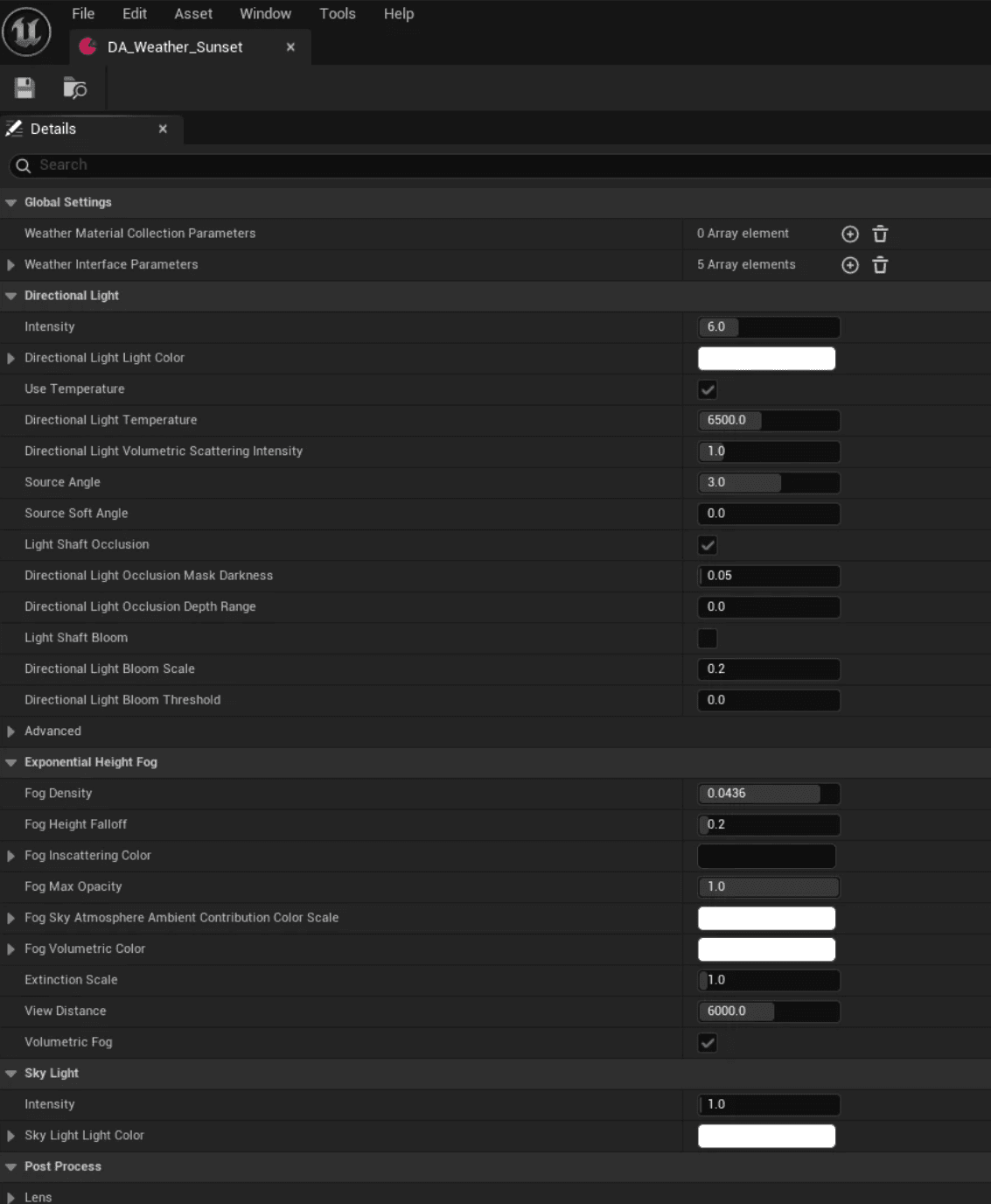
All the settings were saved into this data asset
All the settings were saved into this data asset
Repeat the process for each condition your project requires — Clear Morning, Stormy Afternoon, Foggy Dawn, or any setup the scene calls for. There is no limit to the number of weather states you can author.
Repeat the process for each condition your project requires — Clear Morning, Stormy Afternoon, Foggy Dawn, or any setup the scene calls for. There is no limit to the number of weather states you can author.
Repeat the process for each condition your project requires — Clear Morning, Stormy Afternoon, Foggy Dawn, or any setup the scene calls for. There is no limit to the number of weather states you can author.
Apply a Weather State
Set the Data Asset in the Weather Data Asset property to work with & apply it to the Axiom Weather instace actor in your level:
Set the Data Asset in the Weather Data Asset property to work with & apply it to the Axiom Weather instace actor in your level:
Set the Data Asset in the Weather Data Asset property to work with & apply it to the Axiom Weather instace actor in your level:
Select a weather data asset
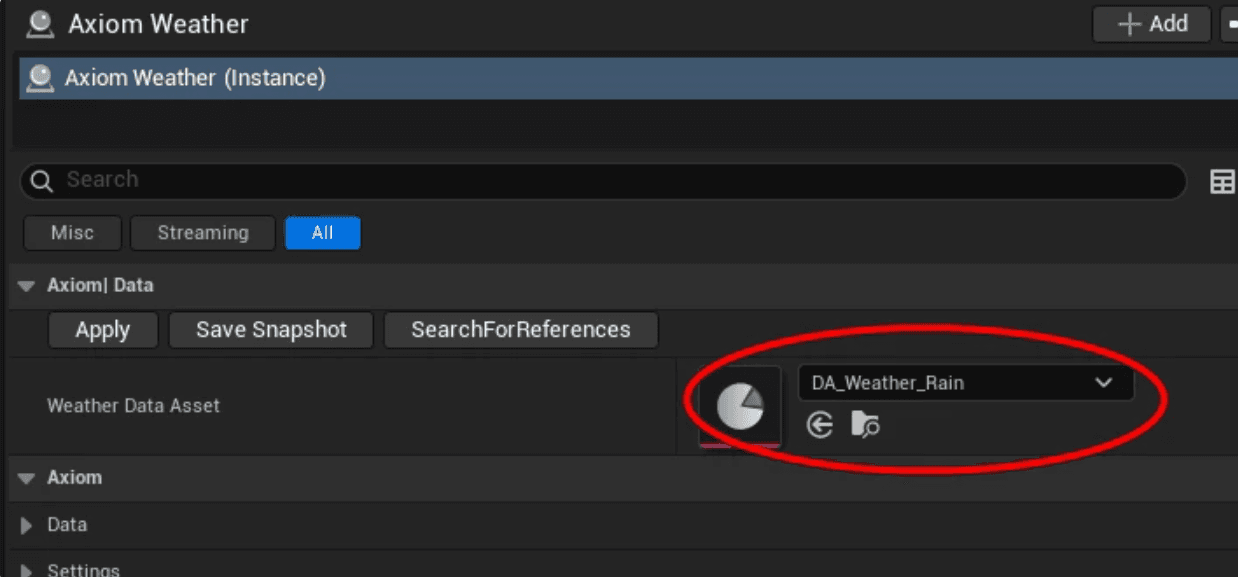
Select a weather data asset
Select a weather data asset
Apply to get all assets and presets in
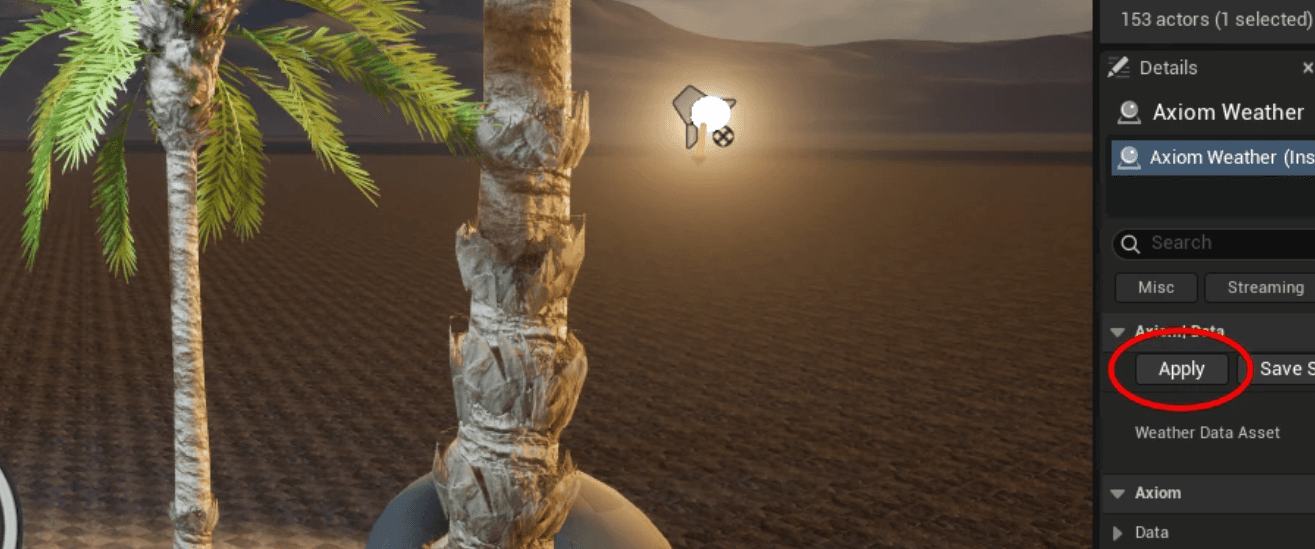
Apply to get all assets and presets in
Apply to get all assets and presets in
Rain weather preset applied including material override, sound, Niagara Systems, lighting configuration and Postprocessing setup
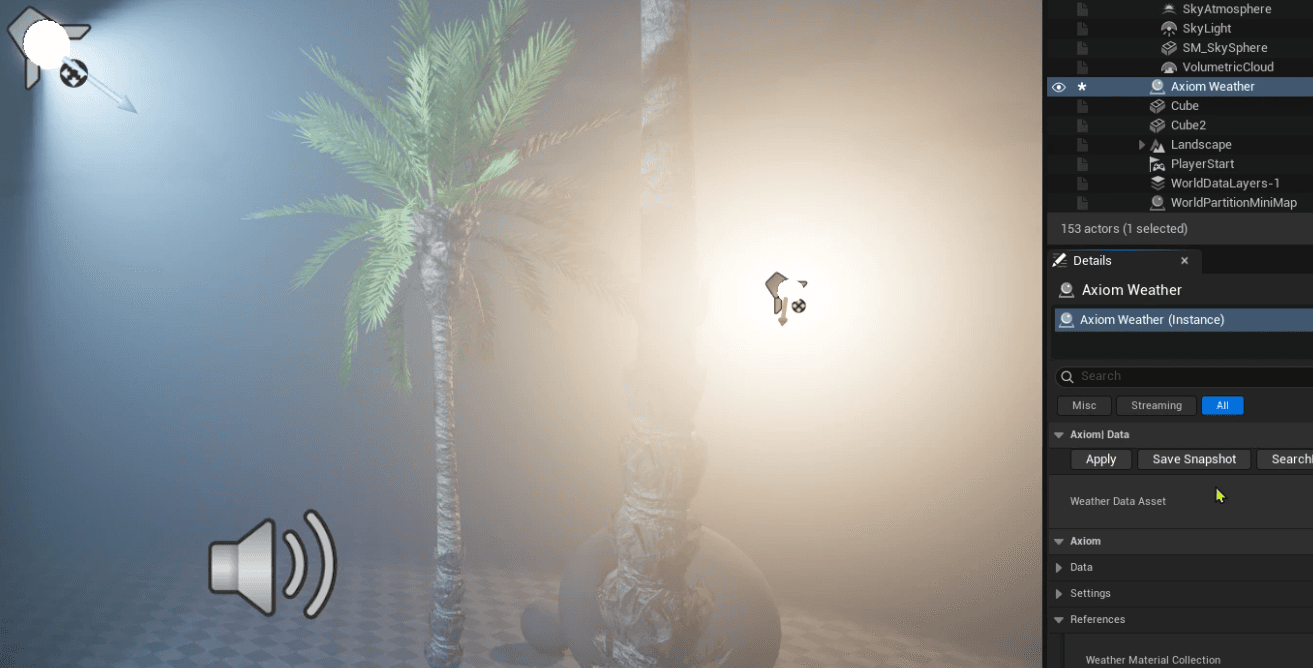
Rain weather preset applied including material override, sound, Niagara Systems, lighting configuration and Postprocessing setup
Rain weather preset applied including material override, sound, Niagara Systems, lighting configuration and Postprocessing setup
Runtime Transitions
At runtime, call the Weather Transition blueprint node to move from one weather state to another. Axiom Weather smoothly interpolates all captured parameters across the specified duration. Transition duration and easing curve settings are available under the Settings section of the Weather actor.
Runtime Transitions
At runtime, call the Weather Transition blueprint node to move from one weather state to another. Axiom Weather smoothly interpolates all captured parameters across the specified duration. Transition duration and easing curve settings are available under the Settings section of the Weather actor.
Runtime Transitions
At runtime, call the Weather Transition blueprint node to move from one weather state to another. Axiom Weather smoothly interpolates all captured parameters across the specified duration. Transition duration and easing curve settings are available under the Settings section of the Weather actor.
Use this blueprint setup to trigger the transition.
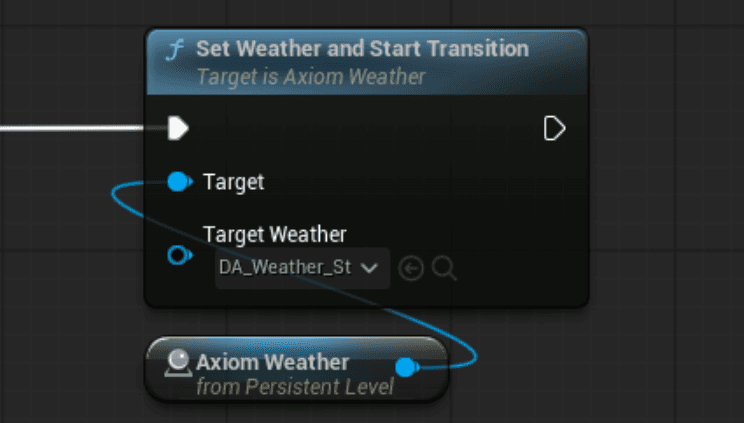
Use this blueprint setup to trigger the transition.
Use this blueprint setup to trigger the transition.
Weather Transition
Weather Transition
Weather Transition
All the transition parameters are under Settings section in the Weather actor
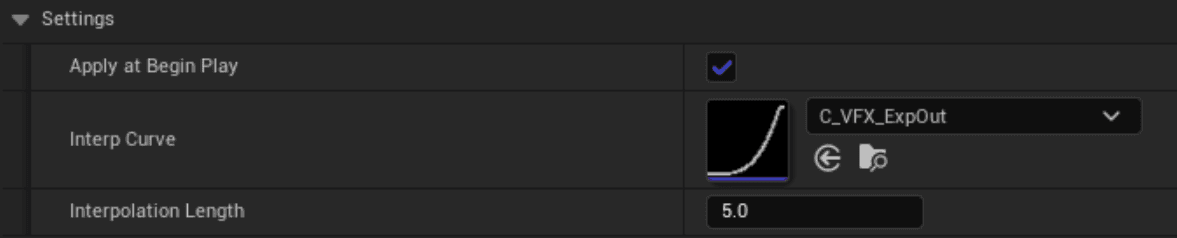
All the transition parameters are under Settings section in the Weather actor
All the transition parameters are under Settings section in the Weather actor
Weather Interface
Axiom Weather exposes a Weather Transition Interface that allows external actors to participate in weather snapshots and transitions without hard-coded dependencies on the core system. Actors declare what parameters they expose to the weather system. Axiom Weather stores those parameters in snapshots alongside native actor settings. At runtime, each actor applies its own blended values — keeping Axiom Weather agnostic of implementation details.
Weather Interface
Axiom Weather exposes a Weather Transition Interface that allows external actors to participate in weather snapshots and transitions without hard-coded dependencies on the core system. Actors declare what parameters they expose to the weather system. Axiom Weather stores those parameters in snapshots alongside native actor settings. At runtime, each actor applies its own blended values — keeping Axiom Weather agnostic of implementation details.
Weather Interface
Axiom Weather exposes a Weather Transition Interface that allows external actors to participate in weather snapshots and transitions without hard-coded dependencies on the core system. Actors declare what parameters they expose to the weather system. Axiom Weather stores those parameters in snapshots alongside native actor settings. At runtime, each actor applies its own blended values — keeping Axiom Weather agnostic of implementation details.
All the transition parameters are under Settings section in the Weather actor
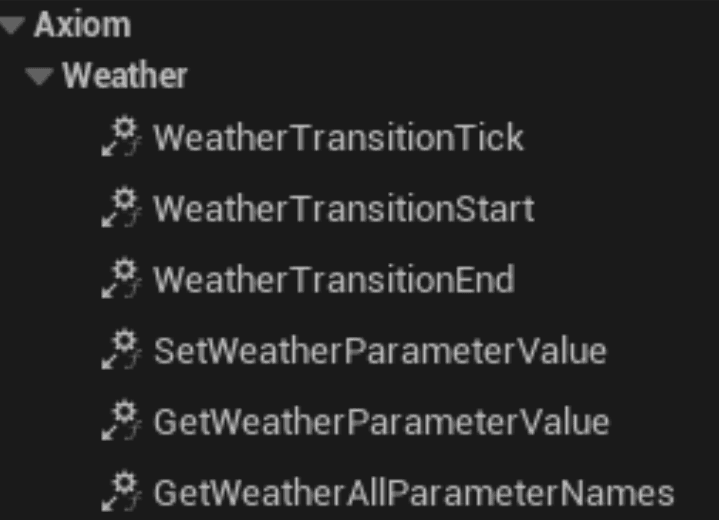
All the transition parameters are under Settings section in the Weather actor
All the transition parameters are under Settings section in the Weather actor
Just like native Unreal actors are referenced explicitly (Directional Light, Fog, Clouds, etc.), Axiom Weather exposes a dedicated Weather Interfaces section:
Just like native Unreal actors are referenced explicitly (Directional Light, Fog, Clouds, etc.), Axiom Weather exposes a dedicated Weather Interfaces section:
Just like native Unreal actors are referenced explicitly (Directional Light, Fog, Clouds, etc.), Axiom Weather exposes a dedicated Weather Interfaces section:

Weather Interface
Weather Interface
Weather Interface
Niagara Systems
Niagara Systems
Rain intensity, density, spawn rate — any float-exposed parameter participates in transitions.
Rain intensity, density, spawn rate — any float-exposed parameter participates in transitions.
Audio Components
Audio Components
Wind, ambient atmosphere, rain volume — audio actors blend smoothly alongside lighting.
Wind, ambient atmosphere, rain volume — audio actors blend smoothly alongside lighting.
Custom Blueprints
Custom Blueprints
Any Blueprint actor with exposed float or scalar properties can join the weather system.
Any Blueprint actor with exposed float or scalar properties can join the weather system.
Gameplay Actors
Gameplay Actors
Systems that need to respond to atmospheric changes integrate without modifying the core.
Systems that need to respond to atmospheric changes integrate without modifying the core.
Scope & Extensions
Axiom Weather is a strong foundation for production weather workflows. It is worth being clear about what it provides out of the box versus what requires additional development.
Scope & Extensions
Axiom Weather is a strong foundation for production weather workflows. It is worth being clear about what it provides out of the box versus what requires additional development.
Scope & Extensions
Axiom Weather is a strong foundation for production weather workflows. It is worth being clear about what it provides out of the box versus what requires additional development.
Included Out of the Box
Included Out of the Box
• Snapshot capture of any native Unreal actor
• Smooth runtime interpolation between states
• Weather Interface for external system participation
• Blueprint-accessible transition API
• Unlimited authored weather states
Requires Custom Extension
Requires Custom Extension
• Automatic time-of-day progression
• Dynamic solar and lunar cycles
• Procedural weather pattern generation
• Real-world weather data integration
• Preset VFX libraries (available as a service)
Dynamic time-of-day systems, automatic solar and lunar cycles, and procedural weather scheduling are not included — but the transition infrastructure is designed to support those extensions cleanly. If your project requires that kind of dynamic behavior, Axiom Weather is a solid starting point and the additional logic is well-scoped.
Dynamic time-of-day systems, automatic solar and lunar cycles, and procedural weather scheduling are not included — but the transition infrastructure is designed to support those extensions cleanly. If your project requires that kind of dynamic behavior, Axiom Weather is a solid starting point and the additional logic is well-scoped.
Dynamic time-of-day systems, automatic solar and lunar cycles, and procedural weather scheduling are not included — but the transition infrastructure is designed to support those extensions cleanly. If your project requires that kind of dynamic behavior, Axiom Weather is a solid starting point and the additional logic is well-scoped.


Let's work
together
Let's create something beautiful together! At AXIOM VFX, we believe in collaboration to bring your unique vision to life. Get in touch and let's get started!
Let's work
together
Let's create something beautiful together! At AXIOM VFX, we believe in collaboration to bring your unique vision to life. Get in touch and let's get started!
Let's work
together
Let's create something beautiful together! At AXIOM VFX, we believe in collaboration to bring your unique vision to life. Get in touch and let's get started!
Headquarters
Austin, Texas (USA)
Valencia (ESP)
Headquarters
Austin, Texas (USA)
Valencia (ESP)
©2023 AXIOM VFX, INC
Headquarters
Austin, Texas (USA)
Valencia (ESP)
©2023 AXIOM VFX, INC